World of Hyatt Now Lets You Transfer Points Online for Free
World of Hyatt has finally brought points transfers online. Members can now gift points to any other World of Hyatt member directly through the website, at no cost, in amounts from 1,000 up to 525,000 points per calendar year. This was one of the improvements Hyatt promised back in February 2026, when it announced the move to five award pricing levels. The award chart changes landed first; the points gifting tool has now quietly followed. For a programme that is otherwise my favourite hotel loyalty programme, the old process was always a little embarrassing next to Marriott Bonvoy and Hilton Honors, both of which have let members move points online for years.

Photo Credit: Points.com
The new tool is processed by Points.com on Hyatt's behalf, and the experience is about as simple as it gets: pick an amount on a slider, enter your recipient's details, and the points generally arrive within 24 hours.
How It Used to Work
Until now, moving World of Hyatt points between accounts meant downloading the Point Combining Request Form, a PDF that both the sender and recipient had to fill in with their names, addresses, emails and member numbers. The sender then signed an authorisation section, and the completed form had to be emailed (or, in earlier years, faxed or mailed) to Hyatt's customer service team for manual processing.
The form technically stated that points could only be combined for the purpose of booking a specific award stay, and each member could only send or receive a transfer once every 30 days. In practice, it worked, but it was clunky, there was no confirmation on screen, and you were at the mercy of whoever picked up the email at the other end.

Photo Credit: Hyatt Centric East Taipei
How to Transfer World of Hyatt Points Online
I tested the new flow on my own account, and the whole process takes a couple of minutes.
Log in to your World of Hyatt account and head to the Purchase, Share or Gift page on Hyatt's website.
Select the option to gift points. You will be passed through to a Points.com storefront branded for World of Hyatt, already signed in to your account.
Use the slider (or the plus and minus buttons) to choose how many points to gift. The minimum is 1,000 points, and the amount moves in increments of 500. The page shows your current balance and your balance after the gift, and confirms that gift processing is free.
Click Gift Bonus Points and enter your recipient's first name, last name, email address and World of Hyatt member number.
Confirm the transfer. Points generally post to the recipient's account within 24 hours, although transactions flagged for additional review can take up to 10 business days.
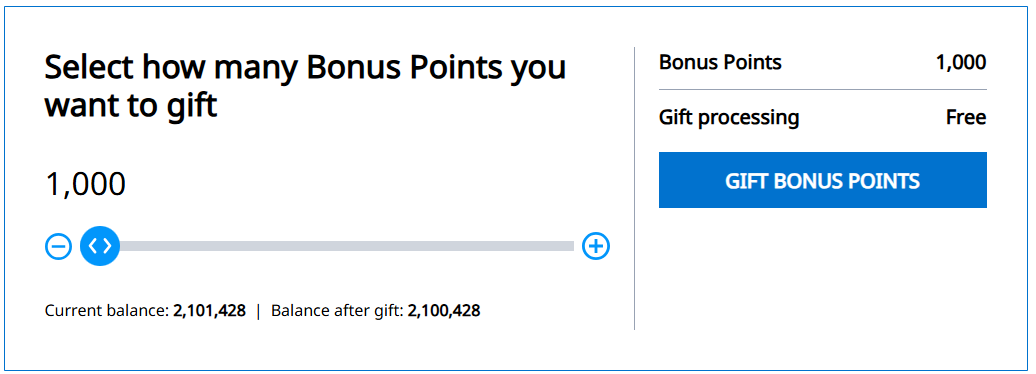
The biggest improvement is simply that the process is now self-service. There is no PDF, no signature from both parties, and no waiting for someone to action an email. You see the amount, your balance after the gift and a confirmation on screen. The recipient also no longer needs to be involved. Under the old form, both members filled in their details; now the sender only needs the recipient's name, email and member number.
The trade-off is a set of clearly defined limits. The old process was loosely policed (the "for a specific award" condition was rarely enforced), whereas the new terms spell out hard caps of 525,000 points per year and six transfers per year. For the vast majority of members, neither cap will ever bite.
This is a fantastic win for couples and families who both earn World of Hyatt points. It matters more for Singapore-based members than for those in the US, because there is no Singapore-issued credit card that converts into World of Hyatt points. Unlike American members with Chase Ultimate Rewards, Singapore-based members earn their points almost entirely from paid stays, which makes every point harder earned and pooling far more valuable.


No more PDF forms. World of Hyatt now lets you gift points to any member online at no cost. Here is how it works and the rules to watch.